Theme Settings
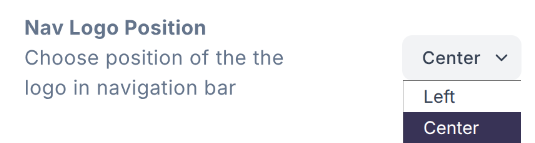
Theme Settings should be used for theme-specific configuration. They are often used to configure different layouts or content that is not part of a section. For example, a theme setting might be used to set the text or URL of a button/link that appears in the navigation and cannot be otherwise configured, or to disable/enable visibility of this button, or to change the position of the agency's logo within the nav.
New theme settings can be added to the app/[domain]/theme-settings.ts file.
You should add the setting to both the interface and the object in the file to ensure proper TypeScript integration.
For example:
import { DefaultThemeSettings } from '@homeflow/v4-lib/state';
// ensure the interface name matches the theme
export interface PolarisThemeSettings extends DefaultThemeSettings {
navLogoPosition: {
type: ConfigSettingType.Select;
value: 'left' | 'center' | 'right';
description: string;
options: { label: string; value: string }[];
};
}
const themeSettings: PolarisThemeSettings = {
navLogoPosition: {
type: ConfigSettingType.Select,
value: 'center',
description: 'Choose position of the the logo in navigation bar',
options: [
{ label: 'Left', value: 'left' },
{ label: 'Center', value: 'center' },
{ label: 'Right', value: 'right' },
],
},
};
export default themeSettings;
You could then access that theme setting from a client comnponent like this:
const themeSettings = useThemeSettings<PolarisThemeSettings>();
const position = themeSettings.navLogoPosition.value;
or in a server component like this:
const themeSettingsConfig = await ThemeSettingsConfig.findOneBy<PolarisThemeSettings>({
agencyId: agency.id,
theme: 'polaris', // change to theme name
});
const position = themeSettingsConfig.settings.navLogoPosition.value;
The theme setting should appear in v4 admin under Configuration > Theme Settings.